This option allows you to send an image as a response to a user query. You can configure this by clicking on the Add a chat element link and then selecting Image.
After choosing Image as the chat element option you have several configuration choices. You can select the size and set the aspect ratio for the image. You can then add a text message to be sent with the notification and finally upload the image to be sent.
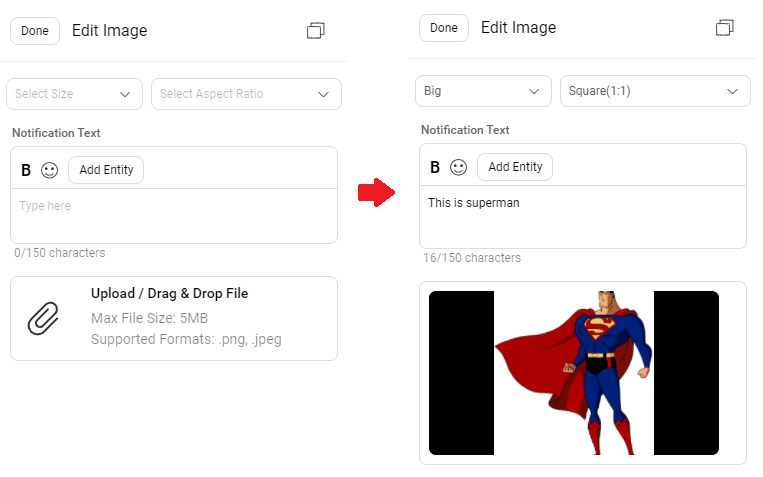
Apart from the Image file size limit being 5 MB, as such, there is no restriction with respect to the image dimensions. You can add an image with any dimension, and it will be accepted.
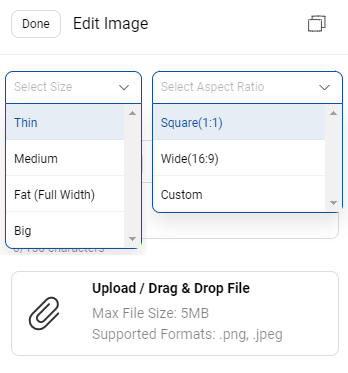
You can customize the image dimensions through these two dropdown menus:
- Select Size
- Select Aspect Ratio
An HSL Image element is a type of Carousel element. In other words, the type is "CAROUSEL", and mainly its width and image URL needs to be specified.
Sample JSON
{
  "text": "*Thats out*!☝️ Ovs)",
  "type": "CAROUSEL",
  "data": {
    "image_aspect_ratio": 1.77,
    "width": "FAT",
    "items": [
      {
        "thumbnail": {
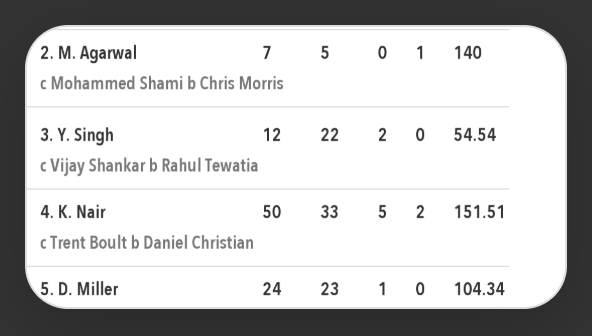
          "image": "http://xxx.yyy.zzz.com/Cricket_Images/Match_Scorecard/Innings_Score_Batting_1_186013_2_1523197798.png",
          "type": "LANDSCAPE"
        },
        "actionables": []
      }
    ]
  }
}
Sample Output
Property Name |
Description |
Required |
|---|---|---|
text |
This is the notification text shown on Apps when a message is sent to users along with the image |
Yes, can be empty |
type |
type list as per the actionables list specified in hsl-properties |
Yes |
data.image_aspect_ratio |
The possible aspect ratios for images |
Yes |
data.width |
THIN, MEDIUM, FAT, BIG defines how much space each carousel item will take, this will be set before the image aspect ratio |
Yes |
data.items |
Multiple images can be shared at a time as per a carousel, however for a single image we will use one item |
Yes |
thumbnail.image |
The image to be sent |
Yes |
thumbnail.type |
DEPRECATED - To be set as LANDSCAPE only |
Yes |