A “Knowledge Graph” represents a network of real-world entities, that is objects, events, situations, or concepts, and illustrates the relationship between them.
For example, consider a statement:
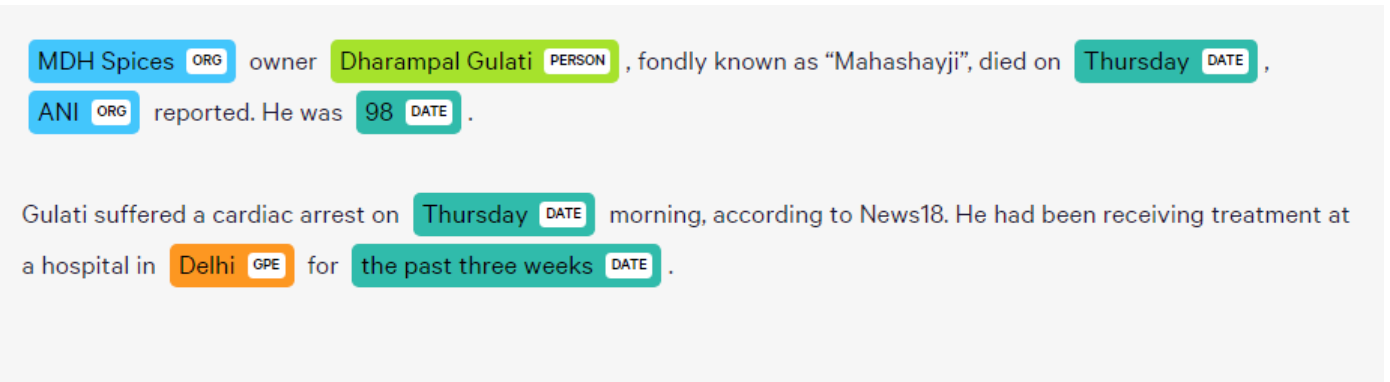
“MDH Spices owner Dharampal Gulati, fondly known as “Mahashayji”, dies on Thursday, ANI reported. He was 98.
Gulati suffered a cardiac arrest on Thursday morning, according to News18. He had been receiving treatment at a hospital in Delhi for the past three weeks.”
From this free text, a Knowledge Graph helps detect and label specific words or phrases that have a unique meaning or import in the context in which they are present (technically referred to as “Named Entity Recognition”, or simply “NER”), as shown.
Commerce Plus Knowledge Graphs
One of the most important things you need to take care of when you are training your ecommerce bot to understand search and Q&A queries is the variety of concepts that can come up in the user queries. Just the presence of 5 or more distinguishing features in a product can give rise to an unmanageable number of unique search queries that will lead to complicating bot training. If a bot is not able to understand these concepts (For example, brand names, colloquial terms like "Chawal"), it will not be able to correctly detect the user's intent, nor will it be able to recommend relevant products to the user.
The Commerce Plus bots are trained using customized, domain-specific Knowledge Graphs. These Knowledge Graphs are built by analyzing millions of user queries, search keywords, and internal domain research. These Knowledge Graphs contain a large number of key entities, concepts, features, brand names, and other product attributes, along with properties that describe their relationship with each other.
This enables the Commerce Plus Bot to accurately recognize domain-specific concepts such as brand names, product features, and other unique attributes used by the shoppers to search for relevant products.
For example, if a user says:
“show me blue striped cotton formal shirts under 3k by Allen Solly”
Here, the Commerce Plus Bot will be able to recognize and classify all the relevant domain-specific entities, such as:
- Category: Clothing
- Subcategory: Shirt
- Occasion type: Formal
- Blue: Color
- Striped: Pattern
- Cotton: Fabric type
- Under 3k: Price range below 3000
- Allen Solly: Brand
Apart from this, the Knowledge Graphs also contain information such as:
- Synonyms of key concepts. (e.g. formal | office wear | work)
- Parent-child relationships. (e.g. Formal is a subtype of shirts)
- Semantic concepts (i.e. words or phrases in a user query that do not pertain to a domain-specific keyword or entity) that help recognize the user’s intent.
Categories supported by Commerce Plus
Haptik has pre-built domain-specific Knowledge Graphs for 27 major ecommerce categories, which in turn comprise 368 unique subcategories:
- Clothing and Accessories
- Jewelry
- Shoes and Handbags
- Bags, Wallets, and Luggage
- Watches
- Computers and Accessories
- Electronics
- Musical Instruments
- Office Products
- Health and Personal Care
- Grocery and Gourmet Foods
- Toys and Games
- Baby
- Beauty
- Pet Supplies
- Sports, Fitness, and Outdoors
- Home Improvement
- Home and Kitchen
- Industrial & Scientific
- Lawn & Garden
- Automotive
- Video Games
- Software
- Books
- Movies and TV Shows
- Gift Cards
- Music
Click here for a complete breakup of supported categories on Commerce Plus.
In addition, Haptik can also build custom Knowledge Graphs for businesses whose product categories are not readily supported. Building such a graph requires the following:
- Integration with the brand’s product catalog.
- Product tags in the catalog describe an item’s key searchable features and attributes.
- (optional) Access to user search query data from the business.
Building a custom Knowledge Graph takes up to 2 weeks. If your bot requires the use of a custom Knowledge Graph, please connect with your Haptik SPOC.