Push Notification
Push notifications can considerably enhance your customer experience. Haptik can also be configured to receive and handle Push Notifications for the conversation.
Checklist
- Make sure you have a valid APNS (.p8) certificate shared with Haptik
- Make sure your app supports push notifications under Signing & capabilities
Firstly, you will have to update the APPLE_TEAM_ID in your Partner tool, which is available on the Haptik platform. You can navigate to this tool by logging in to Haptik and the admin tools > partner.
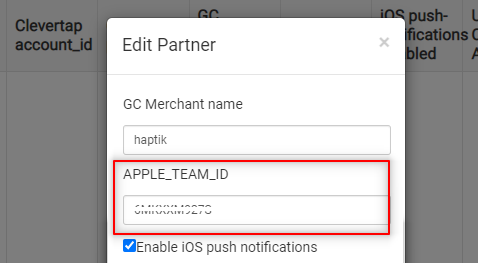
Once you have updated the APPLE_TEAM_ID, make sure you contact the Support team or your Haptik SPOC, for attaching the APNS (.p8) certificate in the backend.
For detailed instructions on how to request an authentication token signing key, see Establishing a Token-Based Connection to APNs.
Sync Device Token
You just need to pass the Device Token to Haptik for it to trigger push notifications from the backend whenever required. One point where you need to set the deviceToken is when the application gets the token after requesting. See the examples below -
func application(_ application: UIApplication, didRegisterForRemoteNotificationsWithDeviceToken deviceToken: Data) {

        ...

        HPKit.sharedSDK.setDeviceToken(deviceToken: deviceToken)
   }
Handle Notification Tap
The Haptik SDK is capable of handling its notifications also. It's also possible to determine whether the notification payload is Haptik-specific or not. If yes then let Haptik handle the notification.
For Haptik to handle its own notifications, you have to pass the required notification response that you get in the notifications payload and the instance of the viewController from where the notifications should be handled. It will take the user directly to the conversation screen.
Here, if the user is a guest user, the code will be:
func application(_ application: UIApplication, didReceiveRemoteNotification userInfo: [AnyHashable : Any], fetchCompletionHandler completionHandler: @escaping (UIBackgroundFetchResult) -> Void) {

        let haptikNotification = (HPKit.sharedSDK.canHandleNotificationWith(UserInfo: userInfo)

                if (haptikNotification == true && application.applicationState != .active) {
            let navController = window?.rootViewController as? UINavigationController
            let controller =  navController?.visibleViewController
            do {
                try HPKit.sharedSDK.loadGuestConversation(launchController: controller!, customData: nil)
            } catch {
                print(error)
            }
        }
}
If the user is a logged-in user, then for custom sign-up the code will be:
func application(_ application: UIApplication, didReceiveRemoteNotification userInfo: [AnyHashable : Any], fetchCompletionHandler completionHandler: @escaping (UIBackgroundFetchResult) -> Void) {

        let haptikNotification = (HPKit.sharedSDK.canHandleNotificationWith(UserInfo: userInfo)
                if (haptikNotification == true && application.applicationState != .active) {

            let navController = window?.rootViewController as? UINavigationController
            let controller =  navController?.visibleViewController

            let authAttribute = HPAttributesBuilder.build { (builder) in
                builder.authCode = "your_auth_code"
                builder.authID = "your_auth_id"
                builder.userName = "user_name"
                builder.email = "abcd@gmail.com"
                builder.mobile = "9876543210"
                builder.signupType = "your_signup_type"
            }

            do {
            try HPKit.sharedSDK.loadConversation(launchController: self, attributes: authAttribute, customData: nil)
            } catch {

                print(error)
             }
        }
}