Overview
One might want to view and analyze the complete customer support journey of their bot in comparison to other customer support touchpoints such as email or telephony. One might even consider seeing historical data of conversations that happened on their bot.
Data Export feature helps Haptik to send RAW data over to your AWS S3 storage. This feature is available under Analytics Pro Plan. There are multiple data points that are stored in the backend which can be accessed using Data Export in real-time.
Please connect with your Haptik SPOC to implement Data Export for your virtual assistant.
Data Points Available on Data Export
You will be able to see the following types of data.
| Date Type | Description | Data Dump Frequency |
| Message Data | Exchange between the bot or agent/system and the user in a conversation is considered as a message data. Each record will contain a unique message_id which acts as a primary key. | Per Message (In a conversation) |
| Conversation Data | Based on the conversation logic i.e. 8 mins or 24 hours, the conversation record will be created and each record will contain a unqiue conversation_identifier which acts as a primary key. | per Conversation |
| Chat Data | This refers to the chat summary about the stories/skills that user visits in the entire conversation. | Per Skill/SkillSet (In a conversation) |
| Agent Metrics Data | Each record will contain a key for each agent (defined as claim_name i.e. gogo or agent name) which can be tagged against the conversation_id to identify the bot/agent involved in a sequence during a conversation. There can be multiple records for the same agents if they have interacted in the same conversation. For exapmle, if the sequence of the user chat is in the following sequence - User<>Bot; User<>Agent; User<>Bot and User<>Agent -- In this case, there will be 4 records within the same conversation. | Per Agent/bot included(In a conversation) |
Feedback Data |
All Feedback collected from end-users is stored in this data type. Here, we have 2 levels of the feedback as mentioned below. 1) Bot Feedback - The feedback rating/comment is stored against each conversation with first & last skill. 2) Agent Feedback - If the dedicated agent feedback flow is enabled on the bot, then the feedback rating/comment will be stored with respect to the claim_name as agent name. In case of multiple feedback, the last skill will be captured for all the feedback's triggered. |
per Conversation |
| Message Feedback: If the user is using our SDK, at a message level, they have an option to provide feedback. Note that this is a part of v1 that is enabled only for few clients but not used by a majority of customers. | per Message (In a conversation) |
To see the data we store on a granular level, download this sheet here. The downloaded sheet contains the sample contract file along with the data points and their definition in detail.
Note: PII data (personal information of a user) is not shared as part of Data Export.
What is the latency to receive the data?
All the data points are pushed to the AWS S3 bucket in near real-time except for the conversation data points. This is because the conversation gets completed at the 24th hour, and the related data points are pushed at the 24th hour.
Can any custom data points be provided via data export?
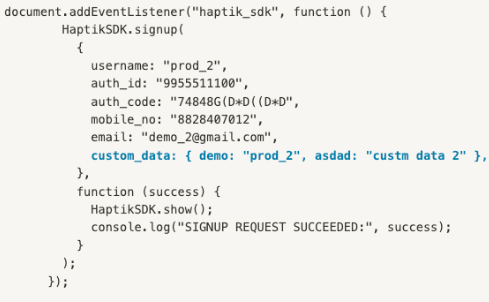
Yes, it can be done. But there is a prerequisite to providing this data. If the client is sending some custom parameters to the Haptik system during the initialization of chatbot, then those data points can be provided in the conversation index, in key-value pair format, as can be seen in the highlighted section below:
Warning
Any custom data points that are sent to Haptik outside the initialization will not be provided via this feature.
Data Export Modules
In general, we have two ways or modules to do a data export, as follows
Traditional Data Export Module
This setup requires the client to share the “Secret Key” and the “Traditional Key” and follow the infosec policy of rotating/changing these keys every 90 days. Once these keys are changed on the client side, these will need to be shared with the Haptik team in advance [2 weeks] for updating the same on our side without causing any data loss.
Implementation Requirements of Traditional Data Export
- Haptik will need to have the WRITE permission on the AWS S3 bucket.
- For AWS S3 Integration, Haptik would need the below information from the client:
- Bucket Name
- Bucket Region
- Secret Key
- Access key
IAM Role-Based Data Export Module
This setup requires the client to perform the below steps:
- Whitelist the Haptik User (arn:aws:iam::810373663331:user/daas_dataexporter) in the Trust policy.
- Provide the following permission to the above role : "Action": "sts: AssumeRole"
- Configure Assume Role ARN to have s3 full access permission.
For example: Assume Role ARN = arn:aws:iam::810373663331:user/daas_dataexporter - Share the role ARN and bucket ARN along with the Bucket name and region details with the Haptik team.
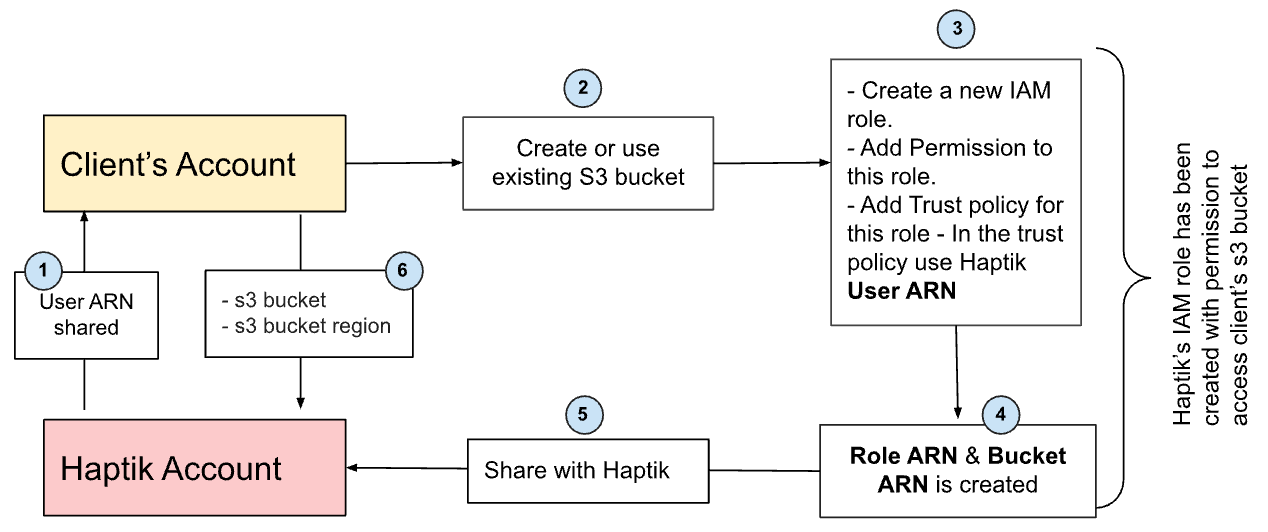
Here, the client does not have to follow the rotational key policy and the data is also secured. To know more, click here.
What is the TAT for doing the Data Export integration?
Once the contracts are signed and depending on the scope of the integration, it will take 2 to 3 weeks for integration, testing, and monitoring. This is to make sure that the data is flowing successfully.
Points to Remember
- This feature is only enabled to connect with the AWS S3 system. No other connector, API, or webhook is available to do the same.
- It is mandatory to have 1:1 mapping between the client ID and the S3 bucket.
- Data Export provides RAW data in JSON file format in UTC time format.
- Historical data is not provided via Data export.
To see a sample implementation of how you can connect our Data Export service to your BI Tool, click here.