Overview
Bot failure for any reason creates a negative experience for the end-user, resulting in a loss of reputation and revenue for the client. Often, these APIs fail, either due to some issue on the client-side or at times due to expired tokens, etc. In such situations, the bot continues to break but no one is alerted of this fact which has a direct impact on the Bot Automation % and CSAT score.
This problem can be solved by creating a timely & real-time alerting mechanism. This helps to monitor all the APIs and record the failures in order to trigger an email notification with the information on the failed APIs. This feature helps clients to stay on the top of their API Health.
API Failure Alert Mechanism
The term refers to a timely & real-time alerting mechanism that monitors all the APIs and records the failures in order to trigger an email notification with the information on the failed APIs. Failure Alerting Mechanism has two types of alerting as below:
-
Real Time Alerting: Based on a set threshold value of 2%, a real-time alert will be triggered to you & our internal team as soon as one or multiple APIs are failing. The email will highlight the API name & the type of failure. The criteria for the real-time alerts is defined as below:
In a time frame of every 15 mins, only if the API failure threshold crosses 2% of all the API calls, an email will be triggered.
Consolidated Reporting: At a set time 10 AM every 24-hour, an email will be triggered to you & our internal team informing about the API. The email will contain a link to download the CSV file with the list of API errors.
You will have access to both types of alerting mechanism. The real-time alerting will transfer the information as soon as the APIs start to fail continuously whereas the timely-failure alerting will provide you with a consolidated report about the API failures that have occurred in the last 24 hours. The link containing the CSV file in this email expires after 6 hours.
Note
For external users [Client-side] to receive API failure emails, they need to be given IVA Analytics Admin access via Permissions Manager.
For internal Haptik users to receive API failure email for their clients, reach out to the product team & you’ll be added to the internal emailer group.
Email Components in API Alert
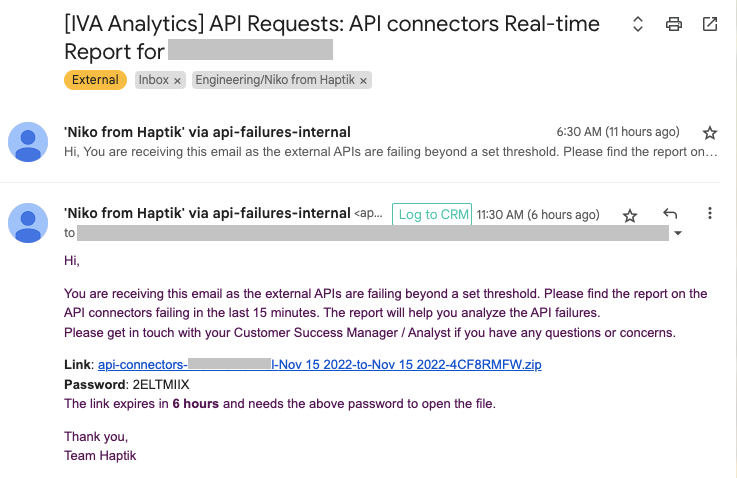
Based on the threshold value & the threshold time frame, an email will be sent to the internal & external audience. This alert email will have a link containing a ZIP file along with a password to access it. Clicking on this will download the zipped CSV file. This file would contain the below information against every API that has failed.
Time stamp |
Time & Date at which the API failed. |
Status Code |
Number that indicates the general classification of the failure. |
HTTP Method |
Describes the action like create, read, update, delete, etc. which the API needs to perform. |
API URL |
Uniform Resource Locator name of the API that failed. |
Exception |
Error details that occur at the runtime. |
Step name |
Step in the bot at which the API failure has occurred. |
Skill name |
Unique information that ties closely with the step name & the API associated. |
System name |
Unique identifier for a specific step in the bot. |
Business-name |
Name of the business. |
Bot-name |
Name of the bot. |
Set Timeout |
Defined time to complete an API call. |
Device Platform |
Name of the device platform on which the bot is configured. |
Click here to know what various API error codes mean.